

What Every Parent Should Know About Digital Safety for Kids in 2025
As a father in a small Alberta town and the IT technician at my local high school, I know firsthand how connected our children are – and how vulnerable. I see kids juggling tablets and smartphones for homework and play, often without realizing the dangers hidden in innocent-looking apps or emails. In 2025 the threats are more sophisticated than ever (AI-generated scams, voice-cloned phishing, etc.), and I worry about my own children and students every time they go online. Cybersecurity experts warn that children’s natural curiosity and trust make them “much more open and trusting” targets than adults. My goal here is to explain the newest online risks, how they vary by age, and what we can do at home to stay one step ahead – without resorting to fear tactics or putting kids under a blanket of guilt.
What’s New in 2025: The Digital Threat Landscape for Children & Teens
Online threats aren’t just about viruses or spam anymore. The most vulnerable targets today are our children, and the tactics used are far more personal.
- AI-Generated Scams: Fake videos and voice-cloned calls are on the rise. Criminals can now use deepfake technology to create realistic-sounding messages or videos of a person you trust – even a friend or teacher – to trick kids and parents. These “digitally altered” media forms make phishing and fraud much more convincing. (For example, experts noted that deepfakes pose risks such as voice cloning and fake videos, turning a friendly call into a sophisticated scam). Reports indicate deepfake-enabled phishing jumped dramatically in 2023, with one source warning of a 3,000% increase in just that year. Always verify unexpected requests by calling back through a known number.
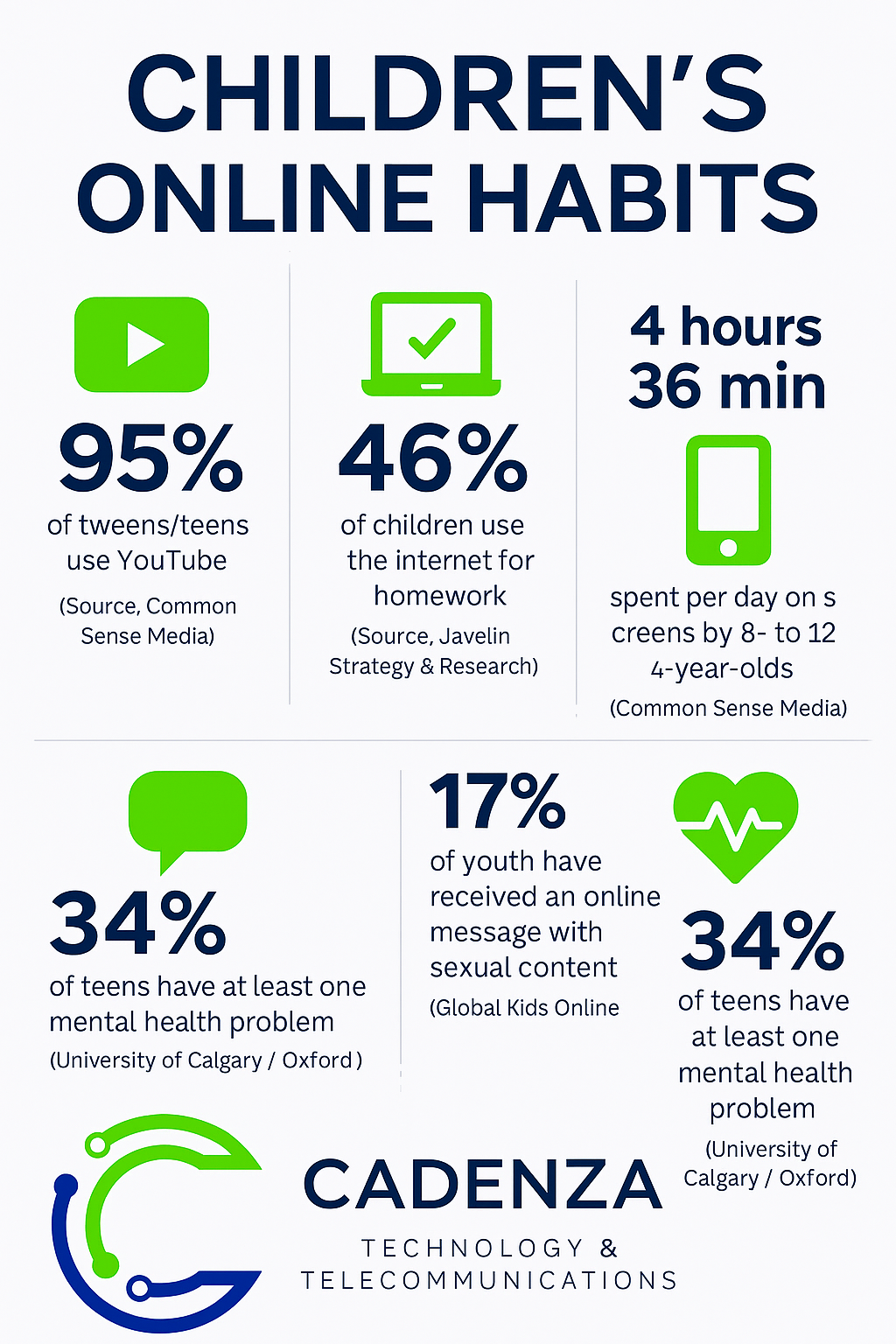
- Online Grooming on Social and Gaming Apps: Predators target children by chatting on apps and games. Since kids spend so much time on social media, messaging and gaming platforms, those have become common grooming grounds. In fact, a UK child-protection charity found that nearly half (48%) of recorded online grooming offenses involved Snapchat. Other popular apps used in these crimes include WhatsApp and Instagram, and any chatroom or gaming network (think Discord, Roblox, or even school chat forums) can hide a predator. Statistics show 9-in-10 teens use platforms like YouTube, and roughly 60% use TikTok or Instagram – so offenders follow them there. Stay alert for overly friendly strangers online, new “friends” asking to move to private chat, or unusual gift offers in games.
- Phishing Masquerading as School Alerts: Scammers are imitating schools and school staff to phish your family. For example, several North American school districts warned of a nationwide scam where students received fake job-offer emails sent from what looked like their own school account. These emails included Google Form links for “free jobs” or financial aid – but after students filled them out, the fraudster started threatening them for money. This shows how attackers exploit students’ trust in their school. The FTC also cautions that scammers “might pretend to be someone from school or a well-known business” to trick teens into clicking malicious links. Always remind kids never to click unexpected links in email or text, even if the sender appears official
- Inappropriate AI-Generated Content (Deepfake Nudes and Extremist Material): Artificial intelligence can churn out explicit or dangerous images and text with a few clicks. Worryingly, child-protection researchers have found tens of thousands of AI-generated sexual images of minors circulating on private forums. In some cases, predators are using AI deepfakes to create fake nude photos or videos for sextortion schemes. One non-profit wrote about a teen who was threatened over a “photo” that was actually a realistic AI creation. Even if it’s technically “fake,” it feels very real to the child. And beyond sexual content, AI can also produce biased or hate-filled content that can mislead kids. According to one analysis, up to 90% of online content could be AI-generated in coming years, so vet anything your child sees online and talk through it together.
- Cyberbullying and Misuse of Personal Data: Cyberbullying has only grown more sophisticated. Kids now report being harassed by edited photos or memes, or having personal secrets (true or false) broadcast on social media. A 2024 survey found a large share of teens say they've experienced online harassment. Even mainstream apps can steal privacy – for example, an earlier study found 1-in-4 Canadian youth (ages 12–17) had been cyberbullied in 2019. AI tools can supercharge this: in one news case, students used AI to create a fake video of a principal saying rude things, purely to embarrass him. And of course, kids are vulnerable if they share personal info – anything from their home address to silly photos – that could be used against them.
- New Scams and Privacy Threats: Other modern scams include fake charity drives (like digital “Fund the Field Trip”), fraudulent online contests, or apps that secretly track location. For example, location-based games or social check-in apps could reveal more than intended. Data privacy is also a concern: some apps collect sensitive data on minors. Be aware that even innocuous-looking productivity or camera apps might upload data to unknown servers, violating Canada’s privacy rules.
Together, these trends mean that the internet landscape of 2025 is both exciting and riskier. Kids can learn much online, but I’ve seen how a single careless click or chat can have real consequences. The next sections break down how these risks play out by age, and what parents can do.
Age-Specific Vulnerabilities
Kids’ online habits change a lot from kindergarten through high school. Here’s a quick look at age-related patterns:
Ages 7-10
Young children often use tablets and family computers for games, learning apps, and videos. They might visit kid-friendly sites or play games like Minecraft or Roblox with simple chat features. At this age:
- Innocence & Impulse: Younger kids are usually too young for complex grooming, but they can accidentally stumble on adult content or ads. (CISA warns that even clicking what seems safe – like a video thumbnail – might lead to malicious pages.
- Accidental Sharing: Kids might chat with “friends” in a game or share their name and school, not realizing it can identify them.
- Technical Gaps: They usually need adult help with passwords or downloads, so it’s easier to restrict what they see.
Overall, the main vulnerabilities are exposure (seeing inappropriate content) and privacy slip-ups. Kids this age should use parental-locked apps or YouTube Kids. Keep devices in common areas and teach them basic rules like “never talk to people you don’t know.”
Ages 11-13
Preteens are often the most vulnerable because they’re gaining independence but still lack full judgment. By middle school:
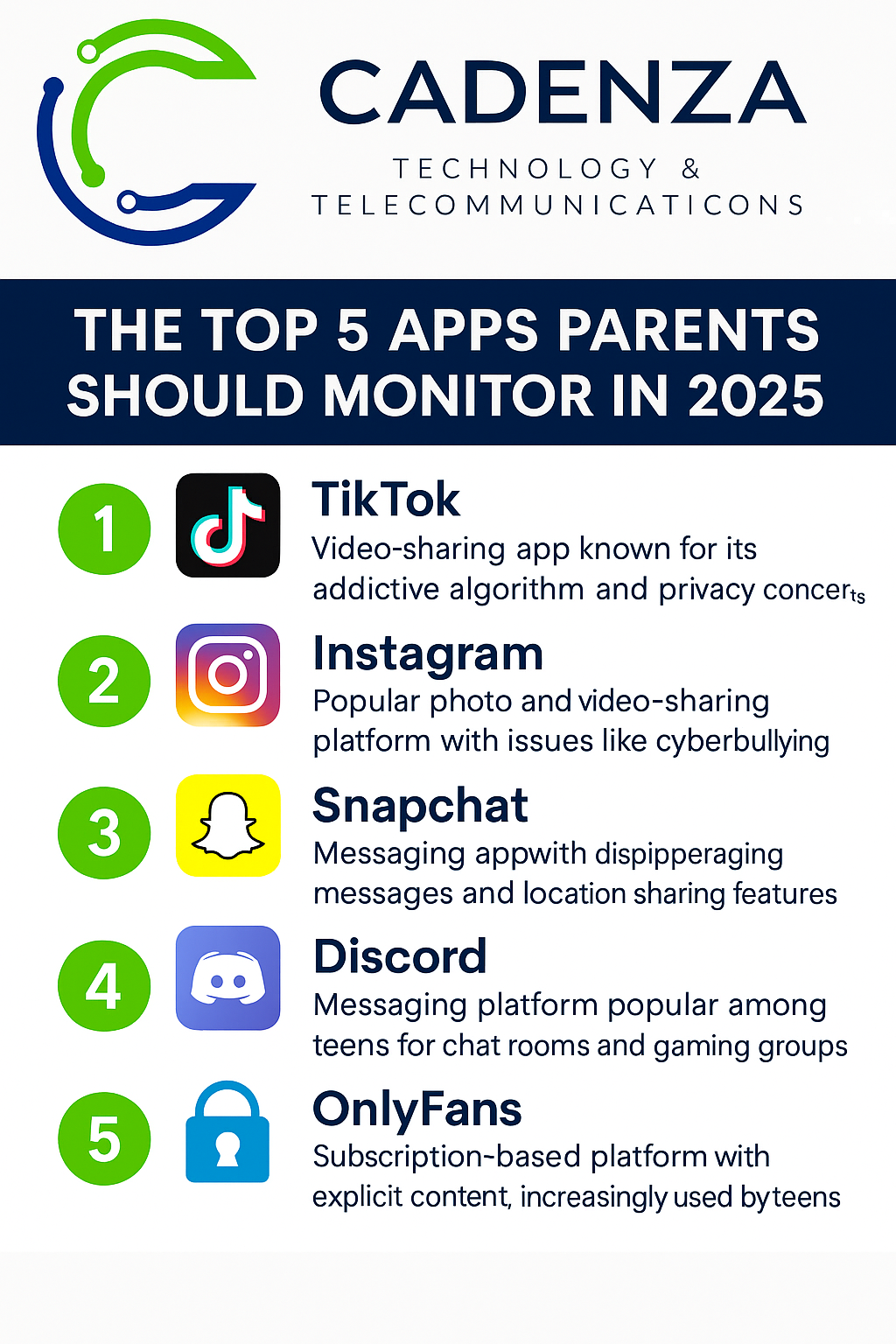
- Social Media Onset: Many in this group have phones or social media (with permission). Platforms like Snapchat, TikTok, Instagram, and YouTube become daily activities. In fact, a 2024 Pew survey found roughly 60% of teens report using TikTok or Instagram, and 55% use Snapchat. This makes them reachable by all the dangers listed above.
- Grooming & Peer Pressure: Primary and middle school kids are increasingly targeted. The NSPCC reports that primary school children were specifically victimized in grooming cases and that online child sexual offences are up nearly 90% since 2018. That means even 10-year-olds need protection online. They may also face rumor-spreading or images circulating among classmates.
- Gaming/Gadgets: Preteens often use gaming consoles or apps (Roblox chat, Minecraft servers, etc.), where they can meet strangers. Cyberbullying – name-calling or exclusion online – can start here and easily spill over to school.
At this stage, kids crave privacy but still need guidance. Use parental controls (e.g. restrict new app downloads, set screen time). Keep conversation open: if they start using a new app, ask them to show it to you. Knowing their usernames or “friends” (as StopBullying.gov suggests) is a good idea.
Ages 14-17
High schoolers are nearly adults online – but they have adult online risks. At this age:
- Advanced Social Platforms: Teens have full-fledged social accounts and messaging apps. They may be on video-chat apps, Telegram, Discord, or even beginning to date online. While they’re savvy, they also face deeper threats: scammers posing as lovers (“sextortion”), advanced phishing for scholarships or jobs, and perpetual connectivity that can lead to anxiety or burnout.
- Sexual Exploitation Risk: Older teens are often targeted for sexual exploitation, too. In 2023 the U.S. National Center for Missing & Exploited Children (NCMEC) received 4,700 reports of child sexual abuse material (CSAM) involving AI. This shows teens are encountering AI-generated pornographic content – sometimes images of other minors – at alarming rates. Teens may also fall prey to fake “sexting” shaming or extortion. We must remind them it’s never their fault if an AI image is faked or shared without consent.
- Financial/Identity Scams: Older teens might have jobs or bank accounts, making them targets for financial scams. The school email job scam we mentioned aimed at young adults seeking work. Teens may also be lured into cryptocurrency or investment scams disguised as “quick money.”
- Mental Health & Privacy: Constant social media can harm self-esteem, and privacy laws protect minors less once they’re 16–17. They may not fully grasp the permanence of online posts (see Infographic idea:
In summary, as kids age, they gain capability but also exposure. Each age group needs age-appropriate boundaries: simpler for young kids, more collaborative for teens. Use the same internet connection and router, but tailor supervision to the child’s maturity and habits.
Guidance for Parents
You don’t need to be a tech genius to protect your family – just stay engaged. Here are practical steps recommended by experts and cybersecurity agencies:
- Review Browsing History and App Usage: Periodically check what sites and apps your children are using. As StopBullying.gov advises, “Monitor a teen’s social media sites, apps, and browsing history… if you have concerns”. This doesn’t mean constant snooping, but a regular check-in (especially if you notice any unusual behavior). Have them include you in friend lists or screen-shares if needed. For example, keep a shared family calendar or notes on what new apps have been installed. Strong password management is also key: know the master passwords for accounts so you can help reset them if something seems off.
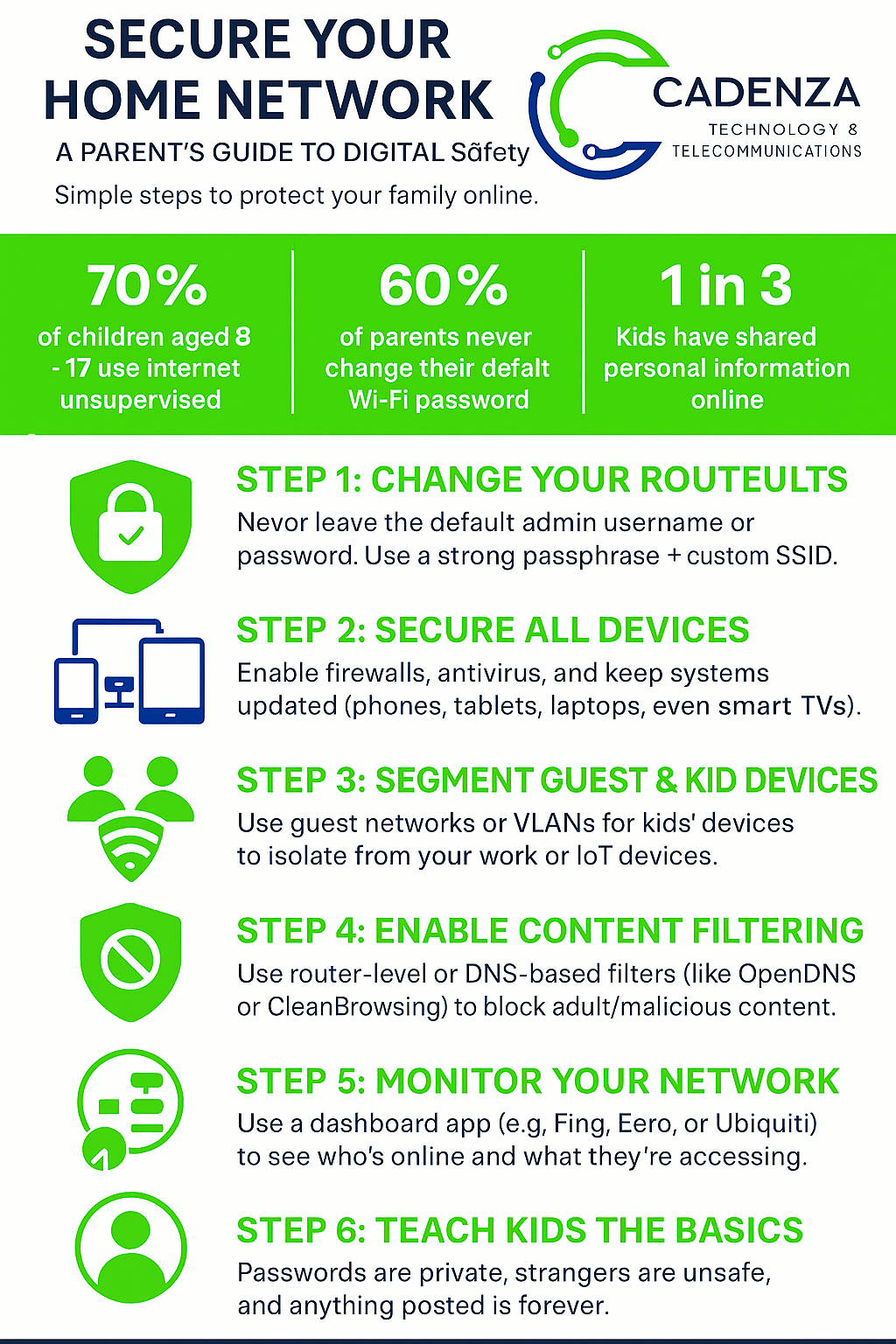
- Implement Parental Controls and Secure the Home Network: Use the tools available on devices and at the network level. Almost every router has settings to filter inappropriate content (SafeSearch, DNS filtering) and to set time limits. Consider setting up a separate “kids” Wi-Fi network on your router with tight restrictions. Update your router firmware regularly and change default passwords to prevent outsiders from hijacking your network. On individual devices, use the built-in parental controls (Screen Time on iOS, Family Link on Android, etc.) to block mature content and limit screen time. CISA even suggests placing your family computer in a common area so you can casually oversee use. (Yes, it sounds old-fashioned, but having the screen visible can deter risky behavior.)
- Talk Openly About Online Safety: Communication is your strongest tool. Set clear but reasonable rules for internet use – what sites are allowed, how much time, and what information is never to be shared. Importantly, explain why. The goal isn’t to scare kids with horror stories, but to make them aware of dangers. Discuss scenarios like “What would you do if someone you met online asked to meet in person?” or “Why should we verify links before clicking?” Use real news (in a gentle way) to illustrate scams or cyberbullying stories. Let your children know they can always come to you if they see something weird or embarrassing online. Saying “I won’t be mad if you tell me something bad happened” goes a long way.
- Stay Informed and Educate Yourself: Keep up with the latest apps and slang that kids use. What’s popular or new in 2025? (Hint: besides TikTok and Instagram, watch out for live-streaming apps and private chat networks that may not be well-known outside teen circles.) Consider joining a parent digital literacy workshop yourself. Many school districts and community organizations now offer free sessions – or you can request one from us (see below).

These measures – monitoring, technology safeguards, and honest conversation – work together. Parents’ instincts (protectiveness) should be paired with knowledge (learning about new risks) for the best results.
At home, think of your internet setup like the locks on your front door. A strong Wi-Fi password, up-to-date router, and “child” user accounts on devices act as security gates. Encourage your children to feel like partners in this effort: for example, have them help choose safer usernames or privacy settings. The US Department of Justice recommends showing kids how to use privacy tools and reporting mechanisms. Remember, tools alone aren’t enough; frequent, calm check-ins reassure kids you care.
Calls to Action (Local Resources): Our company, Cadenza Technology & Telecommunications, is committed to helping Alberta families. We offer free home network checkups – one of our technicians can evaluate your router settings, improve your Wi-Fi security, and ensure parental controls are correctly applied. We also conduct online safety workshops (virtual or in-person) for parents and schools. Keep an eye out for our "Tea, Tech & Talk" sessions being hosted in your community. Topics include spotting phishing, managing screen time, and understanding privacy settings. If you live in rural or small-town Alberta and want personalized support, give us a call or visit our website to schedule a consultation or workshop for your community.
By staying informed and proactive, we can turn the internet into a safer place for our children. The trends may change, but the mission is constant: protect our kids with vigilance, communication, and the right tools. For parents in Alberta and beyond, this blend of technology measures and open dialogue will help ensure that our children can enjoy the benefits of the digital world with far fewer risks.
Sources: Advice and data in this guide are drawn from cybersecurity experts, government agencies, and child-protection organizations (see inline citations). Notable findings include a UK report that nearly half of online grooming incidents involved Snapchat, a 45% jump in Canadian online exploitation reports in 2023, FTC tips on text/email scams, and CISA guidelines on family online safety, among others.
Start the Conversation Early
- For young kids: “We only talk to people we know, even online.”
- For preteens: “If anyone ever sends something weird or scary, you can always tell me – no trouble.”
- For teens: “I know you’re smart, but this stuff is getting really clever. Let me help you spot it.”
Need Help Securing Your Home Network?
Cadenza Technology & Telecommunications offers consultations, smart device audits, and parent-friendly tech checkups. Whether you're in Lac Ste. Anne County or nearby, we’ve got your back.
Book a Free Consultation
Leave a Comment
Comments
No comments yet. Be the first to comment!